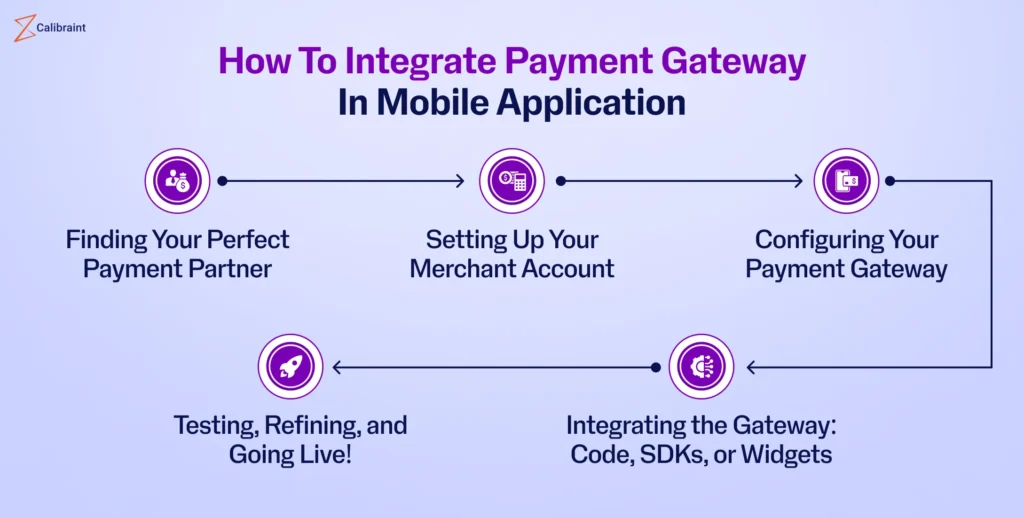
How to Integrate Payment Gateways in Mobile Apps is one of those topics that sounds super technical at first—but once you break it down, it’s actually pretty approachable. Whether you’re building an e-commerce app, a subscription-based service, or even a donation platform, integrating payments is a must-have feature today. The good news? You don’t need to be a fintech expert to get started—you just need the right guidance and a clear roadmap.
Let’s walk through everything in a relaxed, practical way so you can understand not just the “how,” but also the “why” behind each step.
Why Payment Gateway Integration Matters
Think about it—users expect seamless transactions. If your app doesn’t support smooth, secure payments, people will leave faster than you can say “checkout failed.”
A payment gateway acts as the bridge between your app and financial institutions. It handles transactions, ensures security, and confirms whether payments succeed or fail. Without it, your app simply can’t process money.
Here are a few key benefits:
- Faster checkout experience
- Secure handling of sensitive data
- Support for multiple payment methods (cards, e-wallets, etc.)
- Increased user trust and conversion rates
Choosing the Right Payment Gateway
Before diving into coding, you need to pick a payment gateway that fits your needs. Not all gateways are created equal.
Here are some factors to consider:
| Factor | What to Look For |
|---|---|
| Supported Payment Methods | Credit cards, debit cards, e-wallets |
| Fees | Transaction fees, setup costs |
| Security | PCI-DSS compliance, encryption |
| Integration Ease | SDK availability, documentation |
| Regional Support | Availability in your target market |
Popular options include Stripe, PayPal, Midtrans (for Indonesia), and Razorpay.
👉 Tip: Always check if the gateway supports your target audience’s preferred payment methods.
Understanding the Integration Flow
Before jumping into code, it’s important to understand the typical payment flow:
- User selects a product/service
- User enters payment details
- Payment data is sent securely to the gateway
- Gateway processes the transaction
- Response (success/failure) is sent back to your app
Simple, right? But behind the scenes, a lot is happening—especially around security.
Setting Up Your Development Environment
To begin integrating a payment gateway in your mobile app, you’ll typically need:
- API keys from the payment provider
- SDK or library (Android/iOS)
- Backend server (recommended for security)
Here’s where many beginners make a mistake: trying to handle everything on the client side.
Never expose sensitive API keys directly in your mobile app. Always use a backend to manage transactions securely.
Integration Methods: SDK vs API
There are two common ways to integrate payment gateways:
Using SDKs (Recommended)
Most payment providers offer ready-to-use SDKs. These simplify the process significantly.
Pros:
- Faster implementation
- Built-in UI components
- Secure handling
Cons:
- Less customization
Using APIs (Advanced)
If you want full control, you can integrate directly via APIs.
Pros:
- Complete customization
- Flexible workflows
Cons:
- Requires more development effort
- Higher risk if security isn’t handled properly
If you’re just starting out, stick with SDKs. They’re designed to make your life easier.
Step-by-Step Integration Process
Let’s break down a typical integration process using a general approach:
1. Register and Get API Keys
Sign up on your chosen payment gateway platform and obtain your API credentials.
2. Install the SDK
Add the SDK to your mobile app project (Android/iOS).
Example (Android):
implementation 'com.payment.sdk:latest-version'
3. Initialize the Payment Gateway
Set up the SDK using your API keys.
4. Create a Payment Request
Define transaction details like amount, currency, and user info.
5. Launch Payment UI
Use the SDK’s built-in interface or create your own.
6. Handle the Response
Capture success or failure responses and update your app accordingly.
Security Best Practices
Handling payments means handling sensitive data—so security is non-negotiable.
Here are some must-follow practices:
- Use HTTPS for all communications
- Implement tokenization
- Never store card details on your server
- Validate transactions on the backend
- Enable 2-factor authentication when possible
Security isn’t optional—it’s your responsibility.
Common Challenges and How to Solve Them
Even with the best tools, things can go wrong. Here are a few common issues:
Payment Failures
Often caused by network issues or incorrect credentials.
Solution: Implement retry logic and clear error messages.
Poor User Experience
Complicated checkout flows can frustrate users.
Solution: Keep the process simple and intuitive.
Currency and Localization Issues
Not all gateways support every currency.
Solution: Choose a gateway that aligns with your target region.
Testing Your Payment Integration
Before going live, you must test everything thoroughly.
Most gateways provide a sandbox environment where you can simulate transactions.
Checklist:
- Test successful payments
- Test failed transactions
- Test edge cases (timeouts, cancellations)
- Verify backend validation
Never skip testing—it can save you from major headaches later.
Optimizing for Better Conversions
Once your integration works, the next step is optimization.
Here are some tips:
- Minimize the number of steps in checkout
- Offer multiple payment options
- Display trust badges and security indicators
- Enable auto-fill for user details
A smooth payment experience can significantly boost your revenue.
Future Trends in Payment Integration
The world of mobile payments is evolving rapidly. Here are some trends to watch:
- Biometric authentication (fingerprint, face ID)
- AI-based fraud detection
- Cryptocurrency payments
- One-click checkout systems
Staying updated can give your app a competitive edge.
Final Thoughts
Integrating payments into your app might seem intimidating at first, but once you understand the basics, it becomes much more manageable. The key is to start simple, prioritize security, and focus on user experience.
Remember, How to Integrate Payment Gateways in Mobile Apps isn’t just about writing code—it’s about building trust with your users. A reliable, smooth payment system can make all the difference between an app that succeeds and one that gets abandoned.
Take it step by step, test thoroughly, and don’t be afraid to use tools and SDKs that simplify your workflow. Before you know it, you’ll have a fully functional payment system running smoothly inside your app.