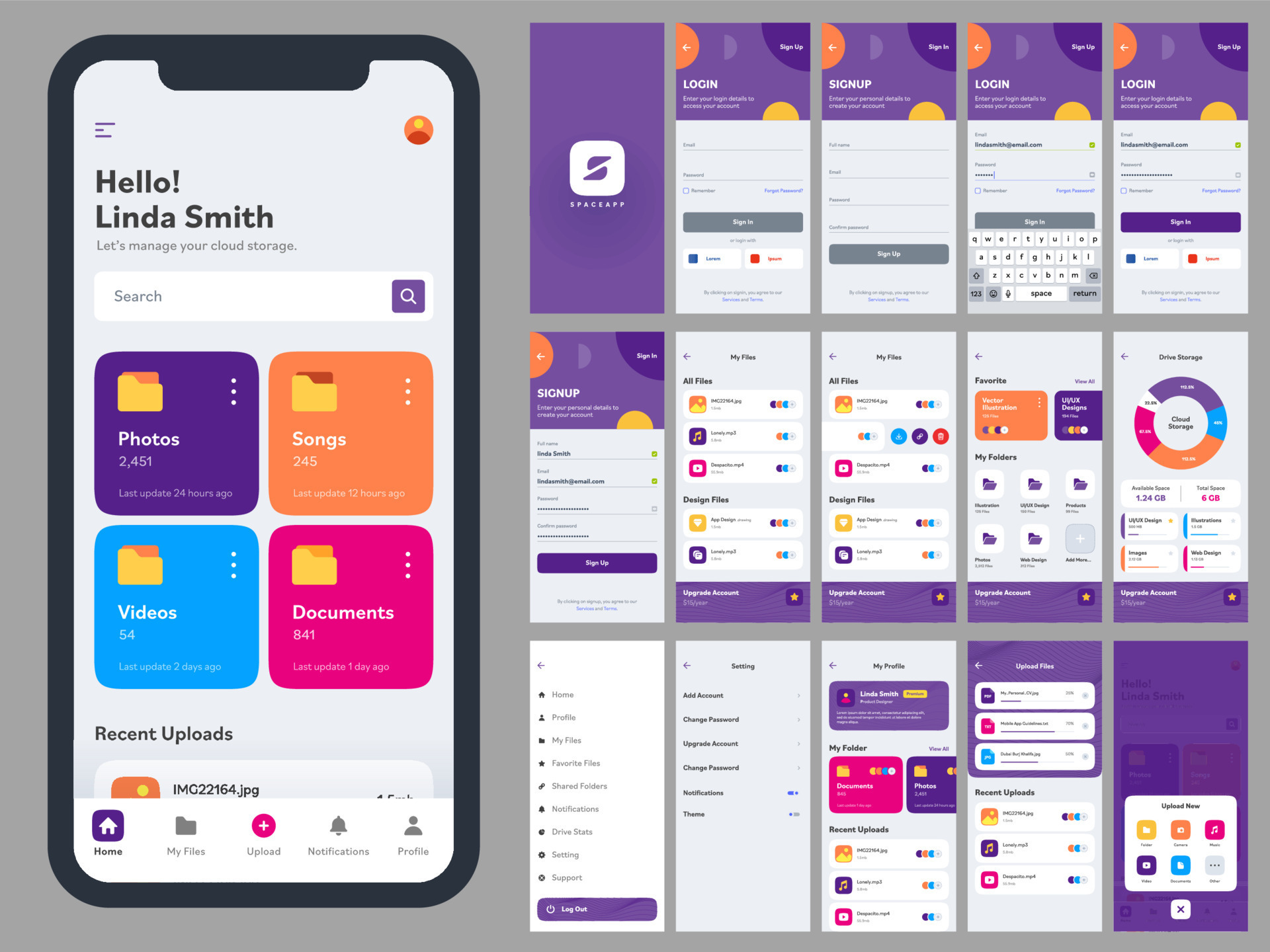
How to Design a User-Friendly App Interface is something almost everyone in tech talks about, but not everyone truly understands. Whether you’re building your first mobile app or refining an existing product, creating an interface that feels natural, intuitive, and enjoyable can make the difference between success and failure. A user-friendly app interface isn’t just about aesthetics—it’s about how people interact, feel, and achieve their goals without friction.
In this guide, we’ll explore practical and human-centered ways to design interfaces that users actually love. We’ll also touch on key principles, common mistakes, and simple strategies you can start applying today.
Understanding What “User-Friendly” Really Means
Before jumping into design tips, it’s important to understand what “user-friendly” actually implies. It’s not just about making things look clean or modern—it’s about usability, accessibility, and clarity.
A user-friendly interface should:
- Be easy to navigate without instructions
- Provide clear feedback for user actions
- Reduce cognitive load
- Feel consistent across screens
Think of it this way: if someone opens your app for the first time and immediately understands what to do, you’re on the right track.
Start with the User, Not the Design
One of the biggest mistakes in app interface design is focusing too much on visuals before understanding the user.
Ask yourself:
- Who will use this app?
- What problem are they trying to solve?
- What frustrates them in similar apps?
This is where empathy plays a major role. A good designer doesn’t just create—they observe and listen.
User-centered design should always be your foundation. This means designing based on real user needs, not assumptions.
Keep It Simple and Clear
Simplicity is the heart of good design. Many apps fail because they try to do too much at once.
Here’s how to simplify your interface:
- Limit the number of actions per screen
- Use clear and familiar icons
- Avoid clutter and unnecessary elements
- Prioritize content hierarchy
A clean interface helps users focus on what matters most. If everything is important, then nothing is.
Consistency is Key
Consistency helps users feel comfortable. When elements behave predictably, users don’t have to relearn how things work.
Maintain consistency in:
- Colors and typography
- Button styles
- Navigation patterns
- Terminology
For example, if a button is blue on one screen, don’t make it green on another unless there’s a clear reason.
Visual consistency builds trust and reduces confusion.
Design for Intuitive Navigation
Navigation is one of the most critical aspects of a user-friendly app interface. If users can’t find what they need quickly, they’ll leave.
Best practices include:
- Use familiar navigation patterns (like bottom tabs or hamburger menus)
- Keep navigation labels simple and descriptive
- Ensure important features are easy to access
A good rule: users should reach their goal in as few steps as possible.
Use Feedback to Guide Users
Every action in your app should have a response. This is known as feedback.
Examples of feedback:
- Button animations when tapped
- Loading indicators
- Success or error messages
Without feedback, users feel lost. With feedback, they feel in control.
Microinteractions—small animations or responses—can significantly improve user experience.
Optimize for Accessibility
A truly user-friendly app works for everyone, including people with disabilities.
Consider:
- Text size and readability
- Color contrast
- Screen reader compatibility
- Touch target sizes
Accessibility isn’t optional—it’s essential. Plus, it often improves usability for all users, not just those with specific needs.
Mobile-First Thinking
Since most users access apps via smartphones, designing with a mobile-first approach is crucial.
Focus on:
- Thumb-friendly layouts
- Fast loading times
- Minimal typing requirements
Mobile users are often on the go, so your interface should be quick and efficient.
Common UI Elements and Their Purpose
Here’s a simple table to help you understand commonly used interface elements:
| UI Element | Purpose | Best Practice |
|---|---|---|
| Buttons | Trigger actions | Make them clearly visible and clickable |
| Icons | Represent actions or content | Use universally recognized symbols |
| Forms | Collect user input | Keep them short and simple |
| Navigation Bars | Help users move between screens | Keep labels clear and consistent |
| Cards | Organize content into sections | Use for readability and structure |
Using these elements properly helps create a smoother user journey.
Test Early, Test Often
No design is perfect from the start. Testing is essential to identify what works and what doesn’t.
Types of testing:
- Usability testing
- A/B testing
- User feedback sessions
Watch how real users interact with your app. You’ll often discover issues you never expected.
Iterative design—improving based on feedback—is the secret to great interfaces.
Avoid Common Design Mistakes
Even experienced designers can fall into traps. Here are some common mistakes to avoid:
- Overloading screens with too much information
- Using confusing navigation structures
- Ignoring user feedback
- Prioritizing aesthetics over usability
Remember: a beautiful app that’s hard to use will not succeed.
The Role of Visual Hierarchy
Visual hierarchy guides users’ attention. It tells them what to look at first, second, and third.
You can create hierarchy using:
- Size (larger elements stand out)
- Color (contrast draws attention)
- Position (top elements are seen first)
A strong hierarchy makes your interface feel organized and intuitive.
Emotional Design Matters
People don’t just use apps—they experience them.
Small touches like friendly messages, smooth animations, and thoughtful details can create a positive emotional connection.
For example:
- A fun loading animation
- A friendly error message
- A satisfying “success” confirmation
Emotional design turns functional apps into memorable experiences.
Performance is Part of UX
Even the best-designed interface fails if the app is slow or unresponsive.
Users expect:
- Fast loading times
- Smooth transitions
- No lag or crashes
Performance directly impacts how users perceive your app’s quality.
Balancing Creativity and Usability
It’s great to be creative, but not at the expense of usability.
Try to:
- Innovate within familiar patterns
- Avoid reinventing basic interactions
- Test new ideas carefully
A unique design is good—but only if users can still understand it.
Final Thoughts
How to Design a User-Friendly App Interface isn’t about following rigid rules—it’s about understanding people. The best interfaces feel almost invisible because they let users achieve their goals effortlessly.
Focus on clarity, simplicity, and empathy. Test your ideas, listen to feedback, and keep improving. Over time, you’ll develop an instinct for what works and what doesn’t.
At the end of the day, a user-friendly interface isn’t just good design—it’s good communication between your app and the people who use it.